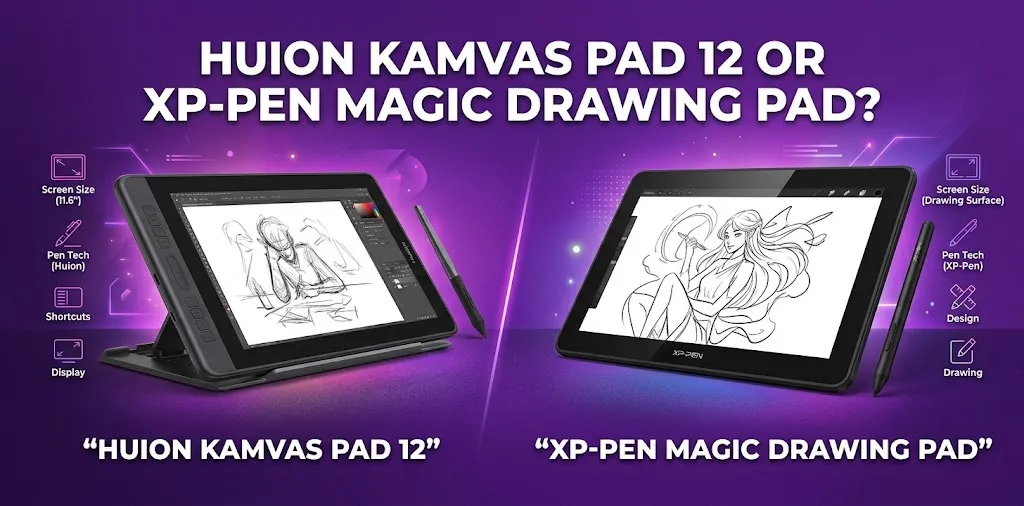
The Huion Kamvas 12 and XP-Pen Magic Drawing Pad are built for very different kinds of artists. The Huion is a traditional pen display that works with a computer or compatible Android device, while the XP-Pen is a standalone Android drawing tablet. That difference matters more than the spec sheet.
If you are trying to choose between them, the real question is not simply which one has the better screen or stylus. It is whether you want a desk-based drawing display or a portable device that can draw on its own.
The XP-Pen Magic Drawing Pad is the better choice for artists who want a portable, all-in-one device with no computer required. The Huion Kamvas 12 is better for artists who already work on a Windows PC, Mac, or compatible Android device and want a lower-cost drawing display with shortcut buttons.
The biggest difference is simple: the XP-Pen can work by itself, while the Huion needs another device to provide the software and processing power.
| Feature | Huion Kamvas 12 | XP-Pen Magic Drawing Pad |
|---|---|---|
| Device type | Pen display | Standalone Android drawing tablet |
| Computer required | Yes, for normal use | No |
| Screen size | 11.6 inches | 12.2 inches |
| Resolution | 1920 × 1080 | 2160 × 1440 |
| Aspect ratio | 16:9 | 3:2 |
| Pressure sensitivity | 8,192 levels | 16,384 levels |
| Tilt support | ±60° | 60° |
| Shortcut buttons | 8 built-in keys | No tablet shortcut keys |
| Operating system | Uses connected device | Android 14 |
| RAM and storage | Depends on connected device | 8GB RAM, 256GB storage |
| Expandable storage | Not applicable | Up to 1TB microSD |
| Weight | About 735g | About 590g |
| Standalone drawing | No | Yes |
| Current official-store pricing | Around $219 before options | Around $499.99 before promotions |
The specifications show an important difference in value. The Huion costs much less, but it is not a complete computer or tablet. If you already own a capable laptop or desktop, that may be perfectly fine. If you need a device that lets you install a drawing app and start creating immediately, the Magic Drawing Pad is the more complete package.
The Biggest Difference: How You Actually Draw
This comparison becomes much easier when you imagine how each device fits into your daily routine.
Huion Kamvas 12: A Drawing Monitor for Your Existing Setup
The Huion Kamvas 12 is essentially a screen you draw directly on. Your computer or compatible Android device runs the drawing software, while the Kamvas shows the canvas and receives your pen input.
This gives you access to desktop creative software and the performance of your existing computer. If your main workflow includes software such as Adobe Photoshop, Clip Studio Paint, Krita, or other desktop applications, the Kamvas fits naturally into that setup.
It also includes eight programmable press keys, which can reduce how often you need to reach for your keyboard. For an artist who spends several hours at a desk, that can be more useful than it first appears.
The trade-off is setup. You need cables, a compatible host device, and enough desk space.
XP-Pen Magic Drawing Pad: A Complete Portable Drawing Device
The Magic Drawing Pad is closer to an Android tablet designed around digital art. It has its own processor, operating system, RAM, storage, battery, and app support.
You can turn it on, open a drawing app, and start working without connecting it to a computer. That makes it much easier to use on a couch, during travel, at school, or anywhere you do not want to bring a laptop.
For example, a student who sketches between classes may find the Magic Drawing Pad much more convenient. There is no laptop to unpack or external display to connect.
On the other hand, someone who already has a powerful desktop workstation may not need another standalone computer. In that situation, the extra cost of the XP-Pen may be less valuable.
Display and Canvas Size
The XP-Pen Magic Drawing Pad has the larger and higher-resolution display.
Its 12.2-inch, 2160 × 1440 screen uses a 3:2 aspect ratio. That taller shape can feel more comfortable for drawing and illustration because the canvas has more vertical room than a typical widescreen display.
The Huion Kamvas 12 has an 11.6-inch, 1920 × 1080 display with a wider 16:9 shape. It is still a Full HD screen and provides a good amount of workspace, but it offers less total canvas area.
The screen difference matters most if you draw detailed illustrations.
A hypothetical comic artist working with portrait-oriented pages may prefer the XP-Pen’s taller display. A desktop artist who uses multiple wide windows and already has a large main monitor may find the Huion’s 16:9 screen less limiting.
Drawing Feel and Pen Performance
Both devices use battery-free stylus technology and support 60-degree tilt, so neither requires regular pen charging.
The XP-Pen Magic Drawing Pad advertises 16,384 levels of pressure sensitivity, while the Huion Kamvas 12 has 8,192 levels. On paper, that sounds like a major win for XP-Pen.
In real-world drawing, though, pressure-level numbers should not decide the purchase by themselves.
Most artists care more about:
- Smooth line control
- Predictable pressure response
- Low perceived lag
- Comfortable pen shape
- Good tilt behavior
- Accurate cursor placement
Both devices are designed for serious drawing, and either can produce professional-looking work. The larger question is where and how you want to create that work.
The Huion uses the PW517 stylus and is designed as part of a traditional desktop pen-display workflow. The XP-Pen uses the X3 Pro Slim stylus and is built around a portable standalone experience.
The Huion’s Shortcut Keys Are a Real Advantage for Desktop Artists
One area where the Huion Kamvas 12 has a practical advantage is workflow control.
Its eight programmable shortcut keys can be assigned to actions such as undo, redo, zoom, brush changes, and other frequently used commands. For artists who rely heavily on keyboard shortcuts, having those controls directly on the display can make a difference.
The Magic Drawing Pad is designed more like a tablet. You use touch controls and app interfaces instead of relying on a row of hardware keys.
This means the Huion may feel more efficient for a person who:
- Draws at a desk every day
- Uses desktop software
- Frequently switches tools
- Wants customizable hardware shortcuts
The XP-Pen may feel simpler for someone who prefers a cleaner, more mobile setup.
Software: Desktop Power vs Android Convenience
This is one of the most important decision points.
Choose the Huion for Desktop Software
Because the Kamvas 12 works with a computer, your software options depend largely on the computer you connect.
That can be a major advantage for artists who need desktop programs with advanced features. The drawing display itself does not limit you to Android apps.
For example, if you already use a PC for professional illustration, photo editing, animation, or graphic design, the Huion can become part of that existing workstation.
Choose the XP-Pen for Mobile Drawing Apps
The Magic Drawing Pad runs Android and can use Android drawing applications. That gives it the convenience of a tablet, but it also means you are working within a mobile operating system.
For sketching, painting, concept art, and many illustration projects, that may be more than enough. But some desktop-only workflows will not transfer directly to Android.
Before buying the Magic Drawing Pad, check whether the specific creative apps and features you use are available on Android.
This is a common mistake. Buyers sometimes compare screen size and pen pressure while forgetting to compare the actual software they need.
Portability and Everyday Convenience
The XP-Pen Magic Drawing Pad is clearly the easier device to carry and use anywhere.
It weighs about 590g and is around 6.9mm thick. It also has its own battery, storage, speakers, and Android system.
The Huion Kamvas 12 weighs about 735g and is around 11.8mm thick, but the larger portability issue is that you also need another compatible device.
If you are leaving home with the Huion, you may need to bring:
- The Kamvas 12
- A laptop or compatible Android device
- Required cables
- A power source when necessary
- Possibly a stand
That does not make the Huion a bad portable device. It simply means the entire working setup is less portable.
For a person who travels with a laptop anyway, the difference may not matter much. For someone who wants to draw in a coffee shop with one device, it matters a lot.
Price: The Huion Costs Less, but the Comparison Is Not Equal
The Huion Kamvas 12 is the more affordable option by a wide margin. Its official store listing is around $219 for the basic configuration, although accessories and optional connection equipment can affect the total cost.
The XP-Pen Magic Drawing Pad has been listed at around $499.99 on the official US store, with promotions sometimes lowering the actual selling price.
That makes the Huion look like the obvious value choice, but remember what you are buying.
With the Huion, you are buying a pen display. You must already own or separately provide the device that runs your software.
With the XP-Pen, you are buying both a drawing surface and the Android tablet that runs the software.
A better way to compare value is this:
Huion Kamvas 12 = lower-cost upgrade for an existing computer setup.
XP-Pen Magic Drawing Pad = higher-cost all-in-one drawing device.
If you already own a good computer, the Huion may provide better value. If you do not have a suitable computer or want to draw independently from one, the XP-Pen may actually save you from buying multiple devices.
Which One Is Better for Beginners?
The answer depends on the type of beginner.
The Huion Kamvas 12 Is Better for a Budget-Conscious Beginner
Choose the Huion if you already own a Windows PC, Mac, or compatible Android device and want to spend as little as possible.
It gives you a proper screen-based drawing experience without paying for another operating system, processor, battery, and internal storage.
The XP-Pen Magic Drawing Pad Is Better for a Beginner Who Wants Simplicity
Choose the XP-Pen if the idea of cables, computer setup, and separate devices sounds frustrating.
You can install supported apps and start drawing on one device. That makes the learning process simpler and more approachable.
For a teenager who wants one portable device for digital art, the Magic Drawing Pad is likely easier to live with. For an adult who already works from a laptop every day, the Huion may be the smarter first purchase.
Which One Is Better for Professional Artists?
Professional artists should think about software first.
The Huion Kamvas 12 makes more sense if your professional work depends on desktop applications or a powerful computer. You can connect it to your existing workstation and use the same software and files you already rely on.
The XP-Pen Magic Drawing Pad is better for professionals who want a dedicated portable sketching device. It can be especially useful for rough concepts, travel work, client presentations, and creating away from the main studio.
The Magic Drawing Pad can also be connected through DP-IN for use with another computer in supported setups, giving it more flexibility. Still, if your entire workflow depends on demanding desktop applications, the standalone Android experience should not be your only reason to choose it.
The Decision Comes Down to Your Workflow
Here is the simplest way to decide.
Buy the Huion Kamvas 12 if:
- You already own a capable computer
- You want to use desktop art software
- Your budget is limited
- You mainly draw at a desk
- You want built-in programmable shortcut keys
- You prefer a traditional pen-display workflow
- You do not need a second standalone tablet
Buy the XP-Pen Magic Drawing Pad if:
- You want to draw without a computer
- Portability is a major priority
- You want one device for art and general tablet use
- You use Android drawing apps
- You need internal storage and expandable microSD storage
- You often draw while traveling or away from your desk
- You are willing to pay more for an all-in-one experience
A Few Buying Mistakes to Avoid
Do not compare only the headline specifications.
Do Not Treat Them as the Same Product Category
The Kamvas 12 and Magic Drawing Pad may both have similar screen sizes, but one is a pen display and the other is a standalone tablet.
A higher price does not automatically mean the XP-Pen is better for your needs. You may simply be paying for features you already have in another device.
Do Not Ignore Your Software
Make a short list of the apps you use now or plan to use.
If you need a specific desktop application, confirm that your workflow will work with the device you choose. If you prefer mobile drawing apps, the Magic Drawing Pad becomes much more attractive.
Do Not Forget the Full Cost of a Setup
The Huion’s low starting price is appealing, but consider any optional stand, cable, or accessories you may need.
Likewise, the Magic Drawing Pad costs more upfront, but it already includes the core computing hardware needed to use it independently.
FAQ
Is the Huion Kamvas 12 better than the XP-Pen Magic Drawing Pad?
Not overall. The Huion Kamvas 12 is better for a lower-cost desktop drawing setup, while the XP-Pen Magic Drawing Pad is better for standalone and portable drawing. The right choice depends mainly on whether you want to connect to a computer.
Can I use the Huion Kamvas 12 without a computer?
No, the Kamvas 12 is not a standalone tablet. It needs to connect to a computer, laptop, or compatible Android device to provide the software and processing power needed for drawing.
Is the XP-Pen Magic Drawing Pad powerful enough for serious digital art?
Yes, for artists whose workflow fits Android drawing applications. It has 8GB of RAM, 256GB of storage, a dedicated drawing stylus, and a paper-like display, but artists who depend on specific desktop-only software should consider their workflow before choosing it.
Final Verdict
For most buyers choosing purely on convenience, the XP-Pen Magic Drawing Pad is the better all-in-one device. You can take it anywhere, draw without a computer, and use it like a regular Android tablet when you are not creating art.
But the Huion Kamvas 12 is the smarter purchase for desktop artists on a budget. If you already own a good computer and mainly draw at a desk, spending less on a dedicated pen display can make more sense than buying another standalone device.
Before you buy, write down the three apps you use most often and the places where you normally draw. That simple check will usually tell you which device fits your workflow better than any single specification.