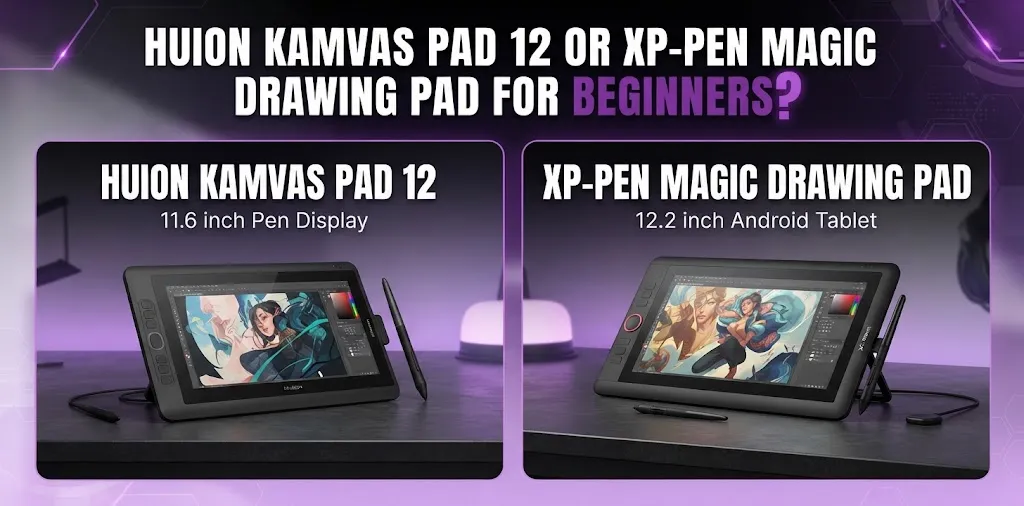
If you are choosing between the Huion Kamvas 12 and XP-Pen Magic Drawing Pad, the better beginner option depends mostly on whether you already own a computer. The Magic Drawing Pad is easier for beginners because it works as a standalone Android tablet, while the Kamvas 12 is better for someone who wants to draw with desktop software.
Both devices let you draw directly on the screen, but they are built for very different setups. That difference matters more than pressure sensitivity numbers or brand preference.
A beginner who buys the wrong type of device can end up with more cables, compatibility issues, or software limitations than expected.
The biggest difference is standalone drawing vs. computer-based drawing
The XP-Pen Magic Drawing Pad is a standalone drawing tablet. It runs Android, has its own processor, memory, storage, battery, and display. You can pick it up, open a compatible drawing app, and start creating without connecting to a computer.
The Huion Kamvas 12 is a pen display. It is designed to work with another device, such as a Windows computer, Mac, Linux computer, or certain compatible Android devices. It does not run drawing software by itself.
That creates two very different beginner experiences.
Choose the XP-Pen Magic Drawing Pad if you want an all-in-one device.
Choose the Huion Kamvas 12 if you already have a suitable computer and want access to desktop creative software.
For many complete beginners, that makes the decision surprisingly simple.
Quick comparison
| Feature | Huion Kamvas 12 | XP-Pen Magic Drawing Pad |
|---|---|---|
| Type | Pen display | Standalone Android drawing tablet |
| Computer required | Yes, in most setups | No |
| Screen size | 11.6 inches | 12.2 inches |
| Resolution | 1920 × 1080 | 2160 × 1440 |
| Screen brightness | Up to 200 nits | Up to 360 nits |
| Pressure sensitivity | 8,192 levels | 16,384 levels |
| Tilt support | Up to 60° | Up to 60° |
| Shortcut buttons | 8 programmable keys | No dedicated side shortcut keys |
| Battery | No internal battery | 8,000 mAh |
| Operating system | Depends on connected device | Android 14 |
| Storage | Uses connected device storage | 256GB, expandable with microSD |
| Weight | About 735g | About 590g |
| Best for | Beginners using a computer | Beginners who want portability and simplicity |
The main difference is that the Magic Drawing Pad has a higher-resolution 3:2 display and more brightness, while the Kamvas 12 gives you physical shortcut keys and broader desktop operating system compatibility.
Which one is easier for a complete beginner?
For a person starting digital art from zero, the XP-Pen Magic Drawing Pad is usually easier.
The reason is not simply that it has more pen pressure levels. Most beginners will not immediately benefit from extremely high pressure sensitivity. The real advantage is that the device removes several setup steps.
With the Magic Drawing Pad, you generally need to:
- Charge the tablet.
- Turn it on.
- Install or open a drawing app.
- Start drawing.
With the Kamvas 12, you need a compatible computer or supported device. You may also need to connect the display correctly, install the driver, configure the pen, and choose drawing software.
That does not mean the Kamvas 12 is difficult to use. Once it is set up, it can be very straightforward. But the XP-Pen creates a simpler path for someone who has never used a drawing tablet before.
Example: A beginner without a computer
Imagine a student who wants to learn digital illustration, watches drawing tutorials, and does not own a powerful laptop or desktop computer.
The Magic Drawing Pad makes more sense because it provides the tablet and computing system in one device. Buying the Kamvas 12 would not solve the computer problem.
Example: A beginner with a good laptop
Now imagine someone who already owns a Windows laptop and wants to learn digital painting using desktop programs.
The Kamvas 12 may be the better fit because the buyer can use the computer they already own and work with desktop creative software.
The lesson is simple: the device you already own can be more important than the tablet you are comparing.
XP-Pen Magic Drawing Pad: Why it may be better for beginners
The strongest advantage of the XP-Pen Magic Drawing Pad is convenience.
It combines a 12.2-inch display, Android operating system, 8GB of RAM, 256GB of storage, battery, and stylus support in one portable device. It also supports expandable storage and includes a high-resolution 2160 × 1440 display.
For a beginner, that can make digital art feel closer to traditional sketching.
You can sit on a couch, take the tablet while traveling, or practice in different rooms without needing a desk setup.
The higher-resolution display can help with detailed work
The Magic Drawing Pad has a 2160 × 1440 display, compared with the Kamvas 12’s 1920 × 1080 resolution.
A beginner does not need to choose a tablet based only on resolution, but the additional screen detail can make the workspace feel sharper.
The 3:2 screen shape may also feel more comfortable for drawing and reading than a wider 16:9 display, depending on the app and artwork.
It is more portable
The Magic Drawing Pad weighs about 590 grams and is only 6.9 mm thick. It also has an 8,000 mAh battery, so it is designed for portable use.
That matters if you want to draw:
- At school or college
- During travel
- On the couch
- At a coffee shop
- Away from your main computer
The Kamvas 12 can still be portable, but its connected-device requirement makes it less convenient for drawing anywhere.
More than just a drawing device
Because the Magic Drawing Pad runs Android, it can also function as a general-purpose tablet for media, browsing, and other supported apps.
That can make it easier to justify for someone who wants one device for drawing and everyday use.
Huion Kamvas 12: Why it may be better for beginners who own a computer
The Huion Kamvas 12 has a different advantage: it is built around a computer workflow.
It has an 11.6-inch full HD laminated display, a battery-free PW517 pen, 8,192 pressure levels, 60-degree tilt support, and eight programmable shortcut keys. It is compatible with Windows, macOS, Linux, and certain Android devices.
For a beginner who already has a suitable computer, this setup can offer more flexibility.
You can use desktop creative software
This is one of the biggest reasons to choose the Kamvas 12.
A pen display connected to a computer gives you access to desktop software and a traditional computer-based creative workflow.
That can be useful for beginners who want to learn more advanced illustration, photo editing, animation, graphic design, or other creative tasks over time.
The Magic Drawing Pad is more convenient, but Android apps may not offer the same experience or feature set as every desktop program.
Physical shortcut keys can improve workflow
The Kamvas 12 has eight programmable press keys.
Beginners may not care much about shortcut buttons at first, but they become more useful as you learn common commands.
For example, you might assign shortcuts for:
- Undo
- Redo
- Brush size
- Zoom
- Eraser
- Canvas rotation
This can reduce the need to reach for the keyboard constantly.
The pen does not need charging
The Kamvas 12 uses battery-free electromagnetic resonance pen technology.
That means you do not need to remember to charge the pen before drawing. For beginners, it is a small convenience, but it is one less thing to manage.
Display quality: Which screen is better?
The Magic Drawing Pad has the stronger overall specification on paper for screen resolution and brightness.
It offers:
- A 12.2-inch display
- 2160 × 1440 resolution
- Up to 360 nits of brightness
- 97% sRGB color gamut coverage
- Anti-glare and anti-fingerprint surface treatment
The Huion Kamvas 12 offers:
- An 11.6-inch display
- 1920 × 1080 resolution
- Up to 200 nits of brightness
- Full lamination
- An anti-glare matte surface
- A 120% sRGB color gamut volume specification
The Kamvas 12’s full lamination helps reduce the visible distance between the pen tip and the displayed line. Its matte surface can also provide a more paper-like drawing feel.
For most beginners, though, the more important question is not which screen has the better specification.
Ask yourself where you will draw.
If you will use the tablet in different locations, the brighter Magic Drawing Pad may be more convenient. If you will mainly draw indoors at a desk connected to a computer, the Kamvas 12’s screen may be perfectly suitable.
Does 16K pressure sensitivity make the XP-Pen much better?
Not necessarily.
The Magic Drawing Pad lists 16,384 levels of pressure sensitivity, while the Kamvas 12 lists 8,192 levels.
That sounds like a major difference, but beginners should not assume that double the pressure levels means double the drawing quality.
The actual drawing experience also depends on:
- Pen tip feel
- Pressure curve
- Drawing software
- Display response
- Your drawing technique
- How well the pen works with the chosen app
Both devices offer pressure-sensitive pens and 60-degree tilt support.
A beginner can create excellent artwork with either one.
Do not buy the Magic Drawing Pad only because the pressure sensitivity number is higher. Its standalone design is a much more meaningful reason to choose it.
Software and app flexibility can change the decision
This is where the two devices separate again.
The Huion Kamvas 12 relies on the software available on the computer or connected device. That can be an advantage because a computer gives you access to a wider desktop workflow.
The XP-Pen Magic Drawing Pad runs Android, so your experience depends on the Android apps you choose.
This creates a trade-off.
The Magic Drawing Pad is simpler
You can keep your drawing tools in one portable device.
That is ideal for someone who wants to learn digital art without building a computer workspace.
The Kamvas 12 is more flexible for a desktop setup
If your goal is to use professional-style desktop software and grow into a computer-based creative workflow, the Kamvas 12 may offer a better long-term path.
Before buying either device, beginners should think about the software they actually want to use. A drawing tablet should fit your preferred apps, not force you into a workflow you do not enjoy.
Portability and workspace
The Magic Drawing Pad is the clear winner for portability.
It is thinner, lighter, battery-powered, and designed to work without another device.
The Kamvas 12 is better suited to a regular drawing space.
A typical Kamvas setup may include:
- The pen display
- A computer or laptop
- Cables
- A power source
- Optional stand
- A keyboard or mouse nearby
That can actually be a good thing if you prefer a dedicated art desk. Some artists like sitting down at the same workspace because it helps them focus.
The Magic Drawing Pad is better if you want the freedom to draw whenever you have time.
What about price for US beginners?
Price should be compared carefully because discounts and promotions can change.
The Magic Drawing Pad has a regular retail price of around $499.99, although promotional prices can vary.
The Kamvas 12 is generally the less expensive type of purchase because it is a display rather than a complete standalone computer. However, its real value depends on whether you already own a compatible computer.
That leads to an important beginner mistake: comparing only the tablet prices.
Think about the total setup cost
Suppose the Kamvas 12 costs less than the Magic Drawing Pad.
If you already own a good computer, the Kamvas may save you money.
But if you need to buy a computer as well, the total cost can become much higher.
The Magic Drawing Pad costs more as a single device, but it includes the computing hardware needed to draw.
For a first-time buyer, the better question is:
How much will it cost me to have a complete setup that lets me draw comfortably?
That is more useful than comparing the two product prices alone.
Which one is better for different types of beginners?
Choose the XP-Pen Magic Drawing Pad if you:
- Do not own a suitable computer
- Want to start drawing immediately
- Prefer an all-in-one device
- Want to draw away from a desk
- Travel frequently
- Want higher screen resolution
- Want a brighter screen
- Also want a general-purpose Android tablet
For these buyers, the Magic Drawing Pad removes many of the technical barriers that can frustrate a beginner.
Choose the Huion Kamvas 12 if you:
- Already own a suitable Windows PC or Mac
- Want to use desktop creative software
- Prefer physical shortcut keys
- Want a dedicated desk setup
- Do not need a standalone tablet
- Prefer a computer-based workflow
- Want to spend less on the drawing display itself
For these buyers, the Kamvas 12 can be a more practical choice.
Common beginner mistakes when choosing between these tablets
The biggest mistake is assuming they are the same type of product.
They are both screen-based drawing devices, but one is a standalone tablet and the other is primarily a display that depends on another device.
Another common mistake is focusing too heavily on specifications such as pressure sensitivity.
A beginner may spend hours comparing 8K and 16K pressure levels while ignoring a more important question: Where and how will I actually draw?
Also, do not assume a smaller upfront price always means a cheaper setup.
If you need to buy a computer for the Kamvas 12, its total cost may be much higher than expected.
Finally, check your preferred software before purchasing. The best hardware choice can become frustrating if it does not support the apps or workflow you want.
My recommendation for most complete beginners
For most beginners starting from scratch, I would choose the XP-Pen Magic Drawing Pad.
The main reason is convenience. It combines the drawing display and the computer into one portable device, so you can focus on learning digital art instead of managing a more complicated setup.
I would choose the Huion Kamvas 12 instead if I already had a capable computer and knew that I wanted to use desktop creative software.
That is the key difference.
The XP-Pen Magic Drawing Pad is the easier first purchase. The Huion Kamvas 12 is the more specialized choice for a beginner building around an existing computer.
Frequently asked questions
Is the XP-Pen Magic Drawing Pad better than the Huion Kamvas 12?
For a beginner without a computer, yes, because the Magic Drawing Pad works as a standalone Android device. If you already own a suitable computer and want to use desktop software, the Kamvas 12 may be the better choice.
Can I use the Huion Kamvas 12 without a computer?
The Kamvas 12 is not a standalone tablet with its own operating system. It needs to work with a compatible external device, such as a computer or certain supported Android devices, depending on the connection and device compatibility.
Which one is better for learning digital art for the first time?
The Magic Drawing Pad is usually easier because it requires less setup and is ready for portable drawing. The Kamvas 12 is a strong option for beginners who prefer learning through desktop software and already have a suitable computer.
Final verdict
If you want the simplest path into digital art, choose the XP-Pen Magic Drawing Pad. It is an all-in-one device that gives beginners more freedom to draw anywhere without depending on a computer.
Choose the Huion Kamvas 12 if you already have a good computer and want the advantages of a desktop-based art workflow.
Before buying, make one practical decision first: Do you want your drawing device to be your complete creative setup, or do you want it to be part of a computer setup? Once you answer that question, choosing between these two tablets becomes much easier.