XP-Pen Artist 12 3rd or Huion Kamvas 13 Gen 3 for Beginners?

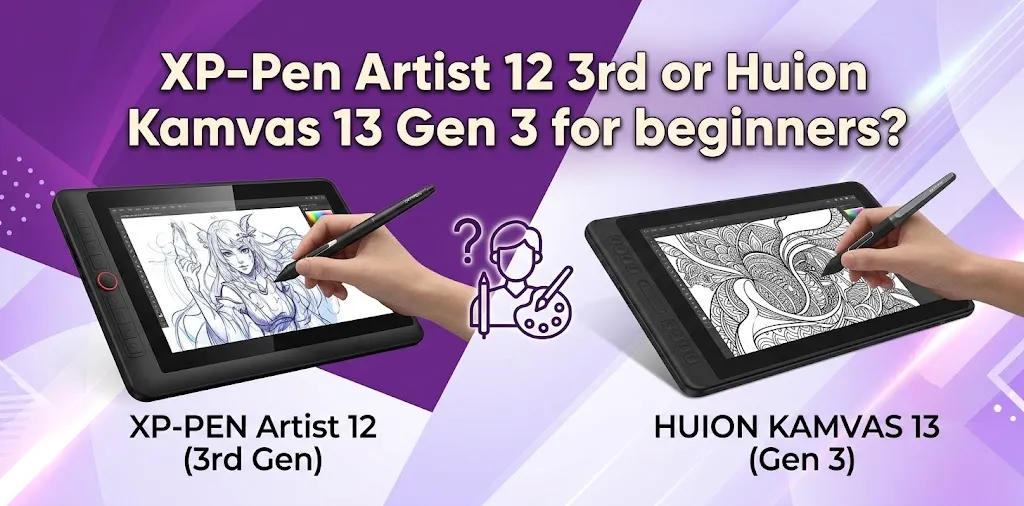
For most beginners, the Huion Kamvas 13 Gen 3 is the better overall choice because its larger 13.3-inch drawing area gives you more comfortable space for learning digital art. However, the XP-Pen Artist 12 3rd is better if you want a lighter, more portable display with a smaller footprint and a stand included.
Both are strong beginner pen displays. They offer similar core features, including a full-laminated 1080p screen, 16,384 levels of pressure sensitivity, tilt support, and etched drawing surfaces. The decision mostly comes down to screen size, portability, shortcut controls, included accessories, and price.
The Differences That Matter Most to Beginners
| Feature | XP-Pen Artist 12 3rd | Huion Kamvas 13 Gen 3 |
|---|---|---|
| Display size | 11.9 inches | 13.3 inches |
| Resolution | 1920 × 1080 | 1920 × 1080 |
| Pen pressure | 16,384 levels | 16,384 levels |
| Tilt support | 60° | 60° |
| Full lamination | Yes | Yes |
| Color coverage | 99% sRGB | 99% sRGB |
| Shortcut controls | 8 keys + 2 dials | 5 keys + 2 dials |
| Weight | About 1.6 lb | About 1.9 lb |
| Stand | Included | Optional |
| Android support | Yes, with compatible USB-C devices | Yes, with compatible USB-C devices |
| Other supported systems | Windows, macOS, ChromeOS, Linux | Windows, macOS, Linux |
The specifications are close enough that neither tablet wins simply because of pressure sensitivity or resolution. Both provide far more pen sensitivity than a beginner needs to start learning.
The bigger difference is how comfortable each device feels during everyday drawing.
Why the Huion Kamvas 13 Gen 3 Is Easier for Many Beginners
The Kamvas 13 Gen 3 gives you a 13.3-inch display, which is a meaningful advantage when using desktop drawing programs.
Programs such as Clip Studio Paint, Krita, Photoshop, and other creative apps have toolbars, layers, menus, brushes, and color panels competing for screen space. On a slightly larger display, the canvas can feel less crowded.
For a beginner, this can make the learning process easier.
Imagine you are learning to draw a character. You may need to switch between your brush tool, eraser, layers, color picker, transform tool, and reference image. The larger screen gives you a little more room to keep those tools visible while still seeing your artwork comfortably.
The Huion also has:
- 5 programmable shortcut keys
- 2 dial controllers
- Additional function-switch buttons
- A larger active drawing area
- PenTech 4.0 pen technology
- Factory-calibrated color performance
Its larger canvas is the biggest reason it is often the safer choice for a first pen display.
The larger screen matters more than beginners may expect
The difference between roughly 12 inches and 13.3 inches does not sound huge on paper. In real use, though, the Kamvas gives you more physical space for your hand and more room for software interfaces.
This is especially useful if:
- You use desktop software with many panels
- You create detailed illustrations
- You work with multiple layers
- You want to use the tablet for several years before upgrading
- You prefer a less cramped workspace
If both tablets cost nearly the same amount, the larger Huion screen usually gives the beginner better overall value.
Why the XP-Pen Artist 12 3rd May Be the Better Choice for You
The XP-Pen Artist 12 3rd is not simply a smaller alternative. It has some practical advantages that may matter more to certain beginners.
At about 719 grams, it is lighter than the Huion Kamvas 13 Gen 3. It also takes up less desk space and is easier to carry between locations.
For someone using a small desk, that can make a real difference.
For example, imagine a student with a laptop, keyboard, mouse, and limited desk space. A compact pen display may be easier to position comfortably than a larger device.
The Artist 12 3rd also includes a foldable stand in the package, which is worth considering. The Huion’s adjustable ST300 stand is optional, so the total cost can change depending on where and how you buy it.
The XP-Pen offers:
- A lighter and more compact body
- 8 customizable shortcut keys
- 2 dial controls
- A foldable stand included
- A full-featured USB-C connection option
- Support for ChromeOS in addition to Windows, macOS, Android, and Linux
- A bright 260-nit display
- The X4 Smart Chip stylus with very low initial activation force
If portability and desk space are important, the XP-Pen may actually be the more beginner-friendly choice.
Screen Size: The Most Important Decision
If you are torn between these two tablets, start here.
Choose the Huion Kamvas 13 Gen 3 if you want:
- More drawing space
- More room for desktop software
- A slightly more comfortable canvas for detailed work
- A larger device for long-term use
Choose the XP-Pen Artist 12 3rd if you want:
- A smaller and lighter display
- Better portability
- A tablet that fits more easily on a small desk
- A stand included in the box
For most people learning digital art at home, 13.3 inches is probably the more comfortable size.
For someone who travels frequently or has a limited workspace, the compact XP-Pen can make more sense.
Pen Performance: Both Are More Than Good Enough
Both tablets offer 16,384 levels of pressure sensitivity and up to 60 degrees of tilt recognition.
A beginner should not choose between them based on pressure sensitivity alone.
The difference between 8,192 and 16,384 pressure levels may look important in marketing, but beginners are unlikely to notice a dramatic difference based on the number itself. Brush behavior also depends on the software, pen settings, driver configuration, and how the artist draws.
The more useful question is: Which pen feels more comfortable in your hand?
The Huion Kamvas 13 Gen 3 uses the PW600L pen with PenTech 4.0. Huion emphasizes improved cursor tracking, reduced pen-tip movement, and better edge performance.
The XP-Pen Artist 12 3rd uses the X4 Smart Chip stylus. XP-Pen lists a very low 2-gram initial activation force, which can help with lighter strokes.
Both pens are battery-free.
For a beginner, neither one should hold back your ability to learn line art, sketching, coloring, shading, or digital painting.
The XP-Pen Artist 12 3rd has an advantage if you want more physical controls on the device.
It includes:
- 8 shortcut keys
- 2 dials
The Huion Kamvas 13 Gen 3 includes:
- 5 programmable shortcut keys
- 2 dial controllers
- 2 function-switch buttons
More controls can be helpful, but beginners should not automatically assume that more buttons mean a better experience.
For example, you could set shortcut controls for:
- Brush size
- Zoom
- Undo
- Redo
- Canvas rotation
- Brush
- Eraser
The XP-Pen gives you more direct shortcut options, which can reduce the number of times you reach for your keyboard.
Still, many beginners do not use every physical button. If you are comfortable using keyboard shortcuts, the difference may not be important.
Display Quality: Neither Is a Bad Choice
Both devices use a 1920 × 1080 Full HD display with full lamination and an etched drawing surface.
Full lamination helps reduce the visible gap between the pen tip and the image underneath. This makes drawing feel more direct.
The etched surface also adds texture and reduces glare.
The XP-Pen lists 99% sRGB coverage and a typical brightness of 260 nits.
The Huion lists 99% sRGB and 99% Rec.709 coverage, plus 90% Adobe RGB coverage. Huion also says each Kamvas 13 Gen 3 receives factory color calibration.
For a beginner learning digital art, both screens should provide strong color performance.
If you are creating professional print work with strict color requirements, display calibration and your entire color-managed workflow matter more than simply choosing one of these tablets based on a marketing color-gamut number.
For everyday illustration, comics, animation, and beginner design work, both displays are suitable.
Which One Is Better for Different Types of Beginners?
For a complete beginner learning digital art
Winner: Huion Kamvas 13 Gen 3
The larger screen gives you a little more breathing room while learning unfamiliar software and building digital drawing habits.
For a beginner with a small desk
Winner: XP-Pen Artist 12 3rd
Its smaller size and lower weight make it easier to fit into a compact workspace.
For a student who needs portability
Winner: XP-Pen Artist 12 3rd
It is lighter and more compact, making it easier to carry with a laptop.
For someone who wants the largest canvas possible
Winner: Huion Kamvas 13 Gen 3
The extra screen space is its clearest advantage.
For someone who wants a stand included
Winner: XP-Pen Artist 12 3rd
The included foldable stand can also make the total purchase package more attractive.
Winner: XP-Pen Artist 12 3rd
Its 8 shortcut keys and 2 dials give you more physical customization.
Price Can Change the Recommendation
The price of both tablets can change depending on sales, bundles, and retailers.
That means the price gap matters.
If the XP-Pen is significantly cheaper, it may offer better value for a beginner who wants a compact first pen display.
If both tablets are within roughly $20 to $30 of each other, the Huion’s larger screen becomes more attractive for most buyers.
However, do not forget to compare what is actually included.
A lower tablet price may become less appealing if you later need to buy a stand separately.
The best comparison is:
Final tablet price + required accessories = your real cost
One Important Thing Before You Buy
Neither device is a standalone computer.
You need to connect the XP-Pen Artist 12 3rd or Huion Kamvas 13 Gen 3 to a compatible computer or supported Android device.
Before buying, check:
- Your computer’s operating system
- Your available USB-C, HDMI, or USB ports
- Whether your USB-C port supports the required video output
- The exact cables included with the model you are purchasing
- Your preferred drawing software
- Whether your Android device supports the necessary USB-C video output
This is an easy mistake for beginners to make. A drawing display is not automatically a self-contained tablet like an iPad.
For example, if you buy the tablet expecting to draw anywhere without a laptop or compatible host device, you may be disappointed.
My Recommendation for Most Beginners
If you want one simple answer, buy the Huion Kamvas 13 Gen 3.
Its larger 13.3-inch display gives beginners more room to learn, makes desktop software feel less cramped, and should provide a more comfortable drawing experience for many people.
Choose the XP-Pen Artist 12 3rd instead if one or more of these points are important to you:
- You have limited desk space
- You want a lighter device
- You travel with your drawing setup
- You want more shortcut controls
- You want a stand included
- You use ChromeOS
- It is noticeably cheaper than the Huion
The gap between these tablets is not huge. Both are modern, capable beginner pen displays.
The Better Choice Based on Two Realistic Scenarios
A beginner using a 15-inch laptop at a desk and planning to learn Clip Studio Paint may prefer the Huion Kamvas 13 Gen 3. The larger display gives more room for layers, tools, and the drawing canvas.
A college student who moves between home, classes, and different workspaces may prefer the XP-Pen Artist 12 3rd. Its lighter weight, compact size, and included stand make the overall setup easier to transport.
This is why the “best” tablet depends less on tiny specification differences and more on where and how you plan to draw.
FAQ
Is the XP-Pen Artist 12 3rd good enough for a complete beginner?
Yes. It has a fully laminated 1080p display, 16,384 pressure levels, tilt support, and enough shortcut controls for beginners to learn digital drawing comfortably. Its smaller size is the main trade-off compared with the Huion.
Is the Huion Kamvas 13 Gen 3 worth the extra money?
It can be worth paying more if the price difference is small and you want a larger drawing area. If the XP-Pen is significantly cheaper or you value portability and the included stand, the Artist 12 3rd may offer better value.
Which tablet will last longer as my skills improve?
Both should remain useful after you move beyond the beginner stage. The Huion may feel less restrictive over time because of its larger screen, while the XP-Pen can remain appealing if you prefer a compact setup and use shortcut controls heavily.
Final Verdict
The Huion Kamvas 13 Gen 3 is the better pick for most beginners, mainly because the larger screen makes learning and using desktop art software more comfortable.
The XP-Pen Artist 12 3rd is the better compact option. If you need portability, have limited desk space, or can get it at a noticeably lower price, it is an excellent first pen display.
One practical tip before ordering: check your computer’s ports and the exact bundle contents first. Then choose the Huion for more canvas space or the XP-Pen for a smaller, lighter, more portable setup.