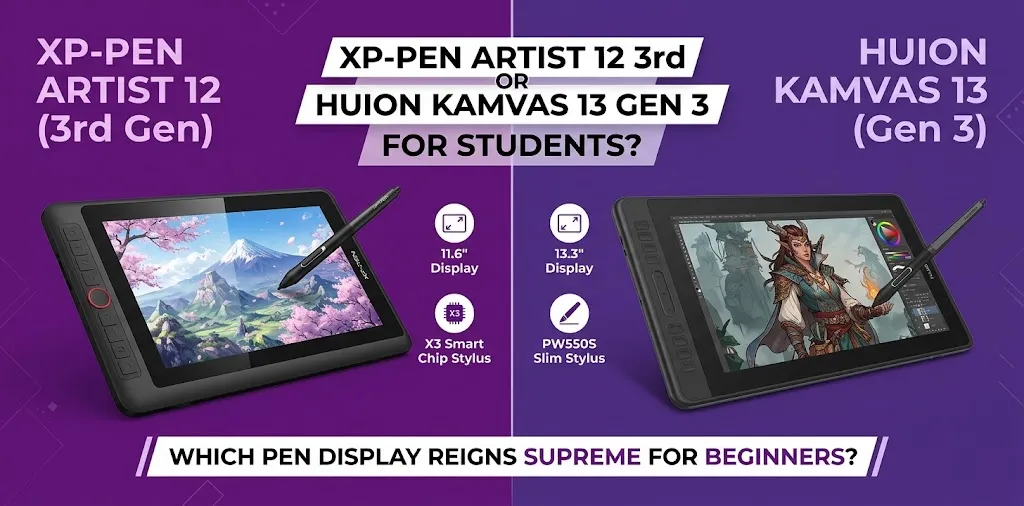
Choosing between the XP-Pen Artist 12 3rd and Huion Kamvas 13 Gen 3 can be tricky because both are affordable screen drawing tablets aimed at beginners and students. They both offer a laminated 1080p display, 16K pressure-sensitive battery-free pens, shortcut controls, and computer connectivity. The biggest differences are screen size, shortcut design, pen controls, portability, and price.
For most students, the Huion Kamvas 13 Gen 3 is the better overall choice if you want a larger drawing area and more physical controls. The XP-Pen Artist 12 3rd is the better pick if portability, a compact design, and its X-Dial control are more important to you.
XP-Pen Artist 12 3rd vs. Huion Kamvas 13 Gen 3 at a Glance
| Feature | XP-Pen Artist 12 3rd | Huion Kamvas 13 Gen 3 |
|---|---|---|
| Display | 11.9-inch | 13.3-inch |
| Resolution | 1920 × 1080 | 1920 × 1080 |
| Refresh rate | 60Hz | 60Hz |
| Full lamination | Yes | Yes |
| Pressure sensitivity | 16,384 levels | 16,384 levels |
| Initial activation force | 2g | 2g |
| Tilt | ±60° | ±60° |
| Color coverage | 99% sRGB | 99% sRGB |
| Adobe RGB | 97% | 90% |
| Shortcut controls | X-Dial + buttons | 2 dials + 5 buttons |
| Pen buttons | Model-dependent | 3 |
| Weight | 719g | 865g |
| Stand | Included on some packages | Optional |
| Computer required | Yes | Yes |
| Best for | Portability and compact desks | Larger workspace and controls |
Specifications can vary slightly by region or product package, so check the current product packaging before buying.
The Biggest Difference: Screen Size
The most obvious difference is the drawing area.
The Artist 12 3rd has an 11.9-inch display with a 1920 × 1080 resolution. The Kamvas 13 Gen 3 uses a larger 13.3-inch 1920 × 1080 display.
That extra screen space may not sound dramatic on paper, but it matters when you’re working with desktop art programs.
A student using Photoshop, Clip Studio Paint, Krita, Illustrator, or another application has to fit the canvas, toolbars, layers, menus, and other controls on the screen. A larger display gives you more room to work without making the interface feel as cramped.
The XP-Pen’s smaller size has a benefit, though. At about 719g, it is significantly lighter than the roughly 865g Kamvas 13 Gen 3. That makes the Artist 12 3rd more attractive if you regularly move between a dorm, classroom, library, and home.
Which screen is better for students?
Choose the Kamvas 13 Gen 3 if you spend long sessions drawing and want more workspace.
Choose the Artist 12 3rd if you value a smaller setup that is easier to carry.
For a student who mostly draws at a desk, the larger Huion screen is usually the more useful advantage.
Drawing Performance Is Very Similar
You do not need to choose between dramatically different pen technologies here. Both tablets are designed around modern battery-free pens with 16,384 pressure levels and a 2g initial activation force.
The XP-Pen Artist 12 3rd uses the X4 Smart Chip Stylus, while the Kamvas 13 Gen 3 uses Huion’s PenTech 4.0 PW600L. Both manufacturers focus on light-pressure detection and improved cursor tracking.
In practical terms, both are capable of handling:
- Digital sketching
- Line art
- Character illustration
- Comics and manga
- Painting
- Animation
- Graphic design
- Photo editing
- School art assignments
The important point is that 16K pressure levels alone should not decide the purchase. Both tablets already have more than enough pressure resolution for a student learning digital art.
How the pen feels in your hand, how the pressure curve is tuned, the screen texture, driver setup, and your preferred shortcut controls can matter more.
XP-Pen Artist 12 3rd: What Makes It Better for Students?
The Artist 12 3rd has a few features that make it particularly interesting for students.
It is lighter and easier to carry
The Artist 12 3rd weighs about 719g, compared with about 865g for the Kamvas 13 Gen 3.
That difference becomes useful when the tablet is part of your everyday school bag.
For example, imagine a student who uses the tablet at home for illustration but also takes it to an art class twice a week. The smaller XP-Pen is easier to pack with a laptop without adding as much weight.
The X-Dial is useful for shortcuts
Instead of relying only on keyboard shortcuts, the Artist 12 3rd includes an X-Dial control system.
A physical dial can be useful for tasks such as changing brush size, zooming the canvas, or adjusting other frequently used functions.
For beginners, this can make certain repetitive tasks feel more natural.
Its display has strong color coverage
The Artist 12 3rd offers strong color coverage and uses a fully laminated display with an anti-glare surface.
That makes it appealing to students who are interested in illustration, graphic design, photography, or other work where screen color matters.
It is priced competitively
The Artist 12 3rd is generally positioned as a budget-friendly screen tablet.
At around the $200 price range when discounted, it can be an attractive option for students who have limited money available for digital art equipment.
Huion Kamvas 13 Gen 3: What Makes It Better for Students?
The Kamvas 13 Gen 3 has a different set of strengths.
The larger display is easier for desktop work
Its 13.3-inch FHD screen gives you more physical drawing space while keeping the same 1920 × 1080 resolution.
For students using a Windows or Mac laptop, this can make a meaningful difference because desktop creative applications often have many panels and controls.
If you are going to spend several hours drawing at a desk, the larger active area is one of the strongest reasons to choose Huion.
It has two dials and five programmable keys
The Kamvas 13 Gen 3 has two dial controllers and five programmable press keys, plus function-switch controls.
That gives students plenty of physical shortcuts without constantly reaching for the keyboard.
You could configure controls for common actions such as:
- Undo
- Redo
- Brush size
- Zoom
- Canvas rotation
- Hand tool
- Eraser
- Layer-related commands
The exact shortcuts you choose will depend on your art software.
The pen has three side buttons
The PW600L battery-free pen includes three customizable side buttons.
For students who rely heavily on shortcuts, having three pen buttons can be more useful than having fewer buttons.
Color performance is strong
The Kamvas 13 Gen 3 provides wide color coverage and is designed for illustration, graphic design, animation, and other creative work.
That makes it suitable for students who want to develop skills beyond basic sketching.
XP-Pen vs. Huion for Digital Art Classes
If your main concern is completing art assignments, either tablet can handle the job.
The better choice depends on how you work.
| Student type | Better choice | Why |
|---|---|---|
| Beginner learning digital drawing | Tie | Both offer strong entry-level pen performance |
| Student who travels often | XP-Pen | Lighter and more compact |
| Student who draws for hours | Huion | Larger 13.3-inch workspace |
| Graphic design student | Huion | Larger screen and strong color options |
| Student on a tight budget | XP-Pen | Usually less expensive |
| Shortcut-heavy workflow | Huion | Two dials, five keys, and three pen buttons |
| Small dorm desk | XP-Pen | Takes up less space |
| Student who wants more drawing room | Huion | Larger active area |
| Android-compatible workflow | Tie | Both support compatible Android connections |
| Student who wants a portable setup | XP-Pen | Lower weight |
Which One Has the Better Display?
This comparison is closer than the screen sizes suggest.
The Artist 12 3rd has a smaller 11.9-inch 1080p display but offers very high color coverage.
The Kamvas 13 Gen 3 has a larger 13.3-inch 1080p display with strong color coverage and color-space options.
For normal student artwork, both screens should provide plenty of color range.
The more important question is what you value more: portability or workspace.
If you’re doing illustration on a small desk, the XP-Pen’s compact design is attractive. If you’re working on detailed compositions with lots of application panels, the larger Huion display has the edge.
Which Is Easier to Carry to School?
The XP-Pen Artist 12 3rd wins this category.
Its listed weight is about 719g, while the Kamvas 13 Gen 3 is about 865g.
Neither is an ultra-light standalone tablet because both still require a host device and cables. But the XP-Pen is the lighter option.
This matters more than it may seem if you already carry:
- A laptop
- Laptop charger
- Notebooks
- Headphones
- Art supplies
- Other school equipment
A few hundred grams saved on the drawing display can make the overall setup easier to carry.
Do Both Tablets Need a Computer?
Yes.
The XP-Pen Artist 12 3rd is a pen display, not a standalone tablet. It needs to be connected to a compatible computer, laptop, or supported Android device to run.
The Huion Kamvas 13 Gen 3 also requires connection to a compatible computer, laptop, or supported Android device.
This is one of the biggest differences between these products and an iPad.
If you want to draw without carrying a laptop, neither model is the right type of device.
Connectivity and One-Cable Use
Both models are designed around USB-C connectivity.
The Artist 12 3rd supports USB-C connections as well as a 3-in-1 connection option.
The Kamvas 13 Gen 3 also supports USB-C and a 3-in-1 connection option.
However, don’t assume that every USB-C port on a laptop will support video output.
Before buying either tablet, check whether your computer’s USB-C port supports the required display-output standard.
Which Is Better for a Student Budget?
The XP-Pen Artist 12 3rd is generally the more budget-friendly choice, although actual prices depend on sales, bundles, and the retailer.
The difference between the two products is often not huge.
If you can comfortably spend a little more, the Huion gives you a larger display and a more extensive physical shortcut system.
For a student on a strict budget, the XP-Pen makes a lot of sense.
For a student who can spend a little more and expects to use the tablet for years, the extra screen space may be worth it.
What About Portability vs. Comfort?
This is probably the most useful way to decide between them.
The Artist 12 3rd is smaller and lighter. That makes it easier to move around and better suited to limited desk space.
The Kamvas 13 Gen 3 is larger and heavier, but the extra drawing area can make long sessions more comfortable.
Think about where you will use the tablet most.
If your setup looks like this:
Laptop + small desk + bedroom/dorm + frequent travel
the XP-Pen is a strong fit.
If your setup looks like this:
Laptop + dedicated desk + long drawing sessions + lots of desktop panels
the Huion is probably the better fit.
Which One Is Better for Beginners?
Both are beginner-friendly, but the answer depends on what you want to learn.
For someone completely new to digital art, the differences in pressure sensitivity are unlikely to be the deciding factor. Both provide high pressure sensitivity and low initial activation force.
A beginner may benefit more from having:
- A comfortable screen size
- A responsive pen
- Easy shortcut controls
- Good software compatibility
- A stable desk setup
- A price that leaves room for software or other art supplies
The Huion gives you more physical controls and a larger workspace.
The XP-Pen gives you a lighter, more compact setup at a generally lower price.
Two Student Scenarios
Scenario 1: A college student in a small dorm
Suppose you’re studying illustration and have a small desk shared with a laptop, textbooks, and other supplies. You also take the tablet home during breaks.
The XP-Pen Artist 12 3rd makes more sense here. Its smaller footprint and lower weight make it easier to manage, while its 11.9-inch laminated FHD display is still large enough for serious beginner and intermediate artwork.
Scenario 2: A student who spends hours drawing at home
Now imagine you’re taking digital illustration classes and spend two or three hours each evening working in Clip Studio Paint or Photoshop.
The Huion Kamvas 13 Gen 3 has a stronger argument. Its 13.3-inch screen gives you more room for the canvas and application interface, while its two dials, five programmable keys, and three-button pen provide plenty of shortcut options.
What I Would Choose
For most students, I’d choose the Huion Kamvas 13 Gen 3 if the prices are reasonably close.
The reason is simple: the larger 13.3-inch screen, larger active area, strong color performance, and extensive shortcut controls make it a more comfortable long-term drawing display.
However, that does not make the XP-Pen a bad choice.
I’d choose the XP-Pen Artist 12 3rd when portability and price matter more than having the largest possible workspace. Its lighter weight, compact design, strong color coverage, X-Dial, and modern battery-free stylus make it a very capable student tablet.
Choose the XP-Pen Artist 12 3rd if:
- You want to spend less.
- You carry your tablet between school and home.
- You have a small desk.
- You prefer a compact drawing display.
- You like the idea of an X-Dial shortcut.
- You want strong color coverage.
Choose the Huion Kamvas 13 Gen 3 if:
- You want the larger 13.3-inch screen.
- You spend long hours drawing.
- You want more physical shortcut controls.
- You prefer a three-button pen.
- You want strong color performance.
- You don’t mind carrying a slightly heavier tablet.
Frequently Asked Questions
Is the XP-Pen Artist 12 3rd better than the Huion Kamvas 13 Gen 3 for students?
The Huion Kamvas 13 Gen 3 is the better overall choice for students who prioritize screen space and shortcut controls. The XP-Pen Artist 12 3rd is better for students who need a lighter, more compact tablet or want to spend less.
Can I use either tablet without a laptop?
No. Both are pen displays that require a compatible computer, laptop, or supported Android device to function. They are not standalone drawing computers like an iPad.
Is 16K pressure sensitivity worth paying extra for?
Neither model has a major advantage here because both provide 16,384 pressure levels. For students, the more meaningful differences are screen size, shortcut controls, portability, software compatibility, and overall comfort.
Final Verdict
The Huion Kamvas 13 Gen 3 is the better overall pick for most students, especially if you plan to spend long periods drawing and want more screen space and shortcut controls.
The XP-Pen Artist 12 3rd is the smarter compact option for students who travel frequently, have limited desk space, or find it at a noticeably lower price.
The practical tip is to choose based on how you’ll actually use the tablet rather than focusing on pressure sensitivity alone. Both pens are highly capable; screen size, portability, controls, and your computer setup will have a bigger impact on your day-to-day student experience.