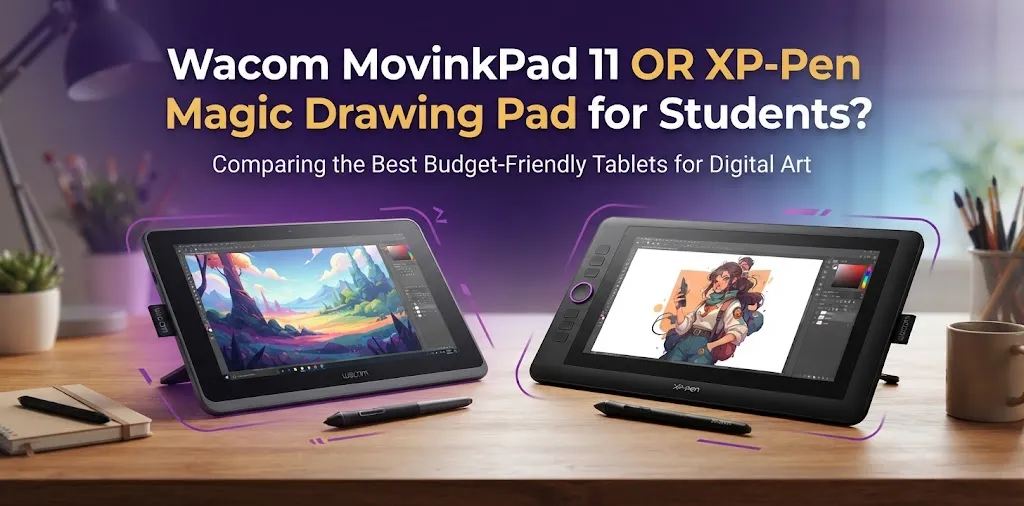
For most students who want the better drawing-focused experience, the Wacom MovinkPad 11 is the stronger choice. The XP-Pen Magic Drawing Pad is better for students who want a larger screen, more storage, and a more versatile Android tablet for drawing, notes, media, and everyday use. The best choice depends on how you plan to use it outside of art.
Both are standalone Android drawing tablets, so you do not need to connect them to a Windows PC or Mac to start drawing. That makes both options appealing to art students, beginners, and students who want to create digital artwork between classes.
The bigger question is not simply which tablet has the better specifications. It is which one fits the way you study, draw, travel, and work.
Wacom MovinkPad 11 vs XP-Pen Magic Drawing Pad at a Glance
| Feature | Wacom MovinkPad 11 | XP-Pen Magic Drawing Pad |
|---|---|---|
| Screen size | 11.45 inches | 12.2 inches |
| Resolution | 2200 × 1440 | 2160 × 1440 |
| Refresh rate | 60Hz / 90Hz | 60Hz |
| Color coverage | 99% sRGB | 97% sRGB |
| RAM | 8GB | 8GB |
| Storage | 128GB | 256GB |
| Expandable storage | Not the main advantage | Up to 1TB via microSD |
| Operating system | Android 14 | Android 14 |
| Battery | 7,700mAh | 8,000mAh |
| Weight | Lighter overall design | 590g |
| Pen pressure | Designed for Wacom drawing workflow | 16,384 pressure levels |
| Standalone use | Yes | Yes |
| Larger workspace | No | Yes |
| Current US pricing | Check current retailer pricing | Official store pricing around the mid-$400 range, with promotions changing |
The Wacom MovinkPad 11 offers an 11.45-inch display with a 2200 × 1440 resolution, up to a 90Hz refresh rate, 8GB of memory, and 128GB of storage. The XP-Pen Magic Drawing Pad has a larger 12.2-inch display, 256GB of built-in storage, microSD expansion, and an 8,000mAh battery.
On paper, the XP-Pen looks stronger in several categories. But students buying a drawing tablet should not choose based on specifications alone.
Why the Wacom MovinkPad 11 May Be Better for Art Students
The biggest reason to choose the Wacom MovinkPad 11 is the drawing experience.
Wacom has a long history in digital art hardware, and that matters when the device will be used mainly for sketching, illustration, comics, character design, or classroom art projects. A tablet can have more storage and a larger screen, but artists still spend most of their time judging the feel of the pen and how naturally they can control a stroke.
The MovinkPad 11 also supports a 90Hz display mode, which can make visual interaction feel smoother than a standard 60Hz tablet. Its 99% sRGB coverage is another advantage for students who care about color while creating artwork for school portfolios or digital presentations.
It Is the Better Choice When Drawing Quality Matters Most
A student who spends several hours practicing line art, digital painting, or illustration will usually care more about pen control than about having a camera or extra internal storage.
For example, imagine a high school student taking digital art classes. They already have a laptop for school assignments and mainly want a portable device for drawing in their bedroom, at school, or during travel. The Wacom makes more sense if the tablet’s primary job is to become their dedicated digital sketchbook.
The smaller size can also be useful for students who already carry textbooks, a laptop, chargers, and other supplies.
The Smaller Screen Is Not Necessarily a Disadvantage
An 11.45-inch display may sound noticeably smaller than a 12.2-inch display, but the difference is not dramatic in everyday use.
Some students may actually prefer the more compact size because it can be easier to carry around campus or fit inside a backpack. A smaller drawing surface can also feel more comfortable when drawing without a desk.
The trade-off is that artists who work with large canvases, reference images, and multiple tool panels may appreciate the extra room offered by the XP-Pen.
Why the XP-Pen Magic Drawing Pad May Be Better for Students
The XP-Pen Magic Drawing Pad is easier to recommend to students who want one device for more than just drawing.
Its 12.2-inch, 3:2 display provides a larger working area, and the device includes 256GB of internal storage. Students can also expand storage with a microSD card, which is useful for saving artwork, reference images, downloaded files, and other media.
The tablet also has four speakers, front and rear cameras, and a larger battery. These features make it feel more like a general-purpose Android tablet that also happens to be built for digital art.
The Larger Screen Is Useful for Multitasking
Students often do more than draw.
You might want a reference photo open while sketching, a video playing while taking notes, or a split-screen setup with a lesson on one side and a drawing app on the other. The extra screen size can make these tasks more comfortable.
The 3:2 aspect ratio is also useful for both drawing and reading. It gives the tablet a shape that can feel more like a sketchbook or notebook than a wide entertainment-focused screen.
Storage Is a Major Advantage for Students
The XP-Pen has twice as much built-in storage as the Wacom model.
That difference can matter more than many students expect.
Large illustration files, reference packs, brushes, downloaded tutorials, and apps can gradually fill a tablet. The option to add a microSD card makes the Magic Drawing Pad more flexible for students who want to keep a large collection of work with them.
For example, a college student who wants to use the tablet for art classes, PDF reading, media, travel, and personal drawing may benefit more from the XP-Pen’s larger storage capacity.
Drawing Experience: The Most Important Difference
For a student buying one of these devices mainly to learn digital art, this category should carry the most weight.
The XP-Pen Magic Drawing Pad uses an X3 Pro Slim stylus with 16,384 pressure levels and up to 60 degrees of tilt support. Its X-Paper display uses an anti-glare and anti-fingerprint surface designed to create a more paper-like drawing feel.
The Wacom MovinkPad 11 takes a more art-centered approach. Its specifications may look less impressive in areas such as storage, but students should remember that drawing quality is about more than pressure-level numbers.
A beginner does not automatically become a better artist because a pen has more pressure levels. What matters more is whether the stylus feels predictable, comfortable, and easy to control.
For Beginners
The difference between these tablets is less important than developing drawing skills.
If you are just starting digital art, both devices offer far more capability than you need to learn basic sketching, layers, brushes, coloring, and digital painting.
A beginner should focus on:
- Whether the tablet feels comfortable to hold
- Whether the screen size feels right
- Which drawing apps they want to use
- How much storage they need
- How much they are willing to spend
For Serious Art Students
Students who are building a portfolio or taking digital illustration more seriously should give extra attention to the drawing experience.
The Wacom is the safer choice when the tablet will be used primarily as a serious art tool. The XP-Pen becomes more attractive when you want a balance between a drawing device and a larger Android tablet.
Screen Size and Portability for School
Students often buy portable technology without thinking enough about what it feels like to carry every day.
The XP-Pen Magic Drawing Pad has the larger 12.2-inch display and weighs about 590 grams. It is also only 6.9mm thick.
The Wacom MovinkPad 11 has a smaller 11.45-inch display, making it the more compact option.
Choose the Wacom if Your Backpack Is Already Full
A student carrying a school laptop, notebooks, chargers, and books may appreciate the smaller device.
It is also a better fit for students who want something that feels close to a portable digital sketchbook rather than a large all-purpose tablet.
Choose the XP-Pen if You Want More Room to Work
The extra screen space is more useful than it may initially seem.
A larger display can make it easier to:
- Work with multiple layers
- Use reference images
- Read PDF files
- Watch tutorials while practicing
- Use split-screen Android features
- Draw for longer periods without feeling cramped
Students who mostly work at a desk may prefer the larger XP-Pen. Students who often draw while traveling may prefer the smaller Wacom.
Performance and Storage for Student Use
Both tablets use Android 14 and include 8GB of RAM, which is enough for common drawing and productivity tasks.
The bigger difference is storage.
The Wacom MovinkPad 11 has 128GB of storage. The XP-Pen Magic Drawing Pad has 256GB and supports expandable microSD storage up to 1TB.
When 128GB Is Enough
The Wacom’s 128GB should be enough for many students.
If you regularly transfer finished artwork to cloud storage or another computer, you may never have a serious storage problem.
It is especially practical for students who already own:
- A Windows laptop
- A Mac
- A desktop computer
- External storage
- A reliable cloud storage plan
When 256GB Plus MicroSD Matters
The XP-Pen is a better option for students who want to keep most of their digital life on the tablet.
The larger storage capacity is useful if you download many:
- Drawing apps
- Large reference images
- Video lessons
- Digital textbooks
- Art files
- Comics or entertainment content
This is one of the strongest practical reasons to choose the Magic Drawing Pad.
Which One Is Better for Taking Notes?
Neither device should be judged exactly like a traditional school note-taking tablet because their main appeal is still the drawing experience.
However, the XP-Pen has the advantage if you want a larger all-purpose workspace for reading and handwriting. Its larger 3:2 screen gives you more room for documents and notes.
The Wacom can still work well for handwritten notes and creative planning, especially if drawing is your main reason for buying the device.
If your priority order is:
- School notes
- PDF reading
- General Android use
- Digital art
The XP-Pen may be the more practical choice.
If your order is:
- Digital art
- Sketching
- Portfolio work
- Occasional notes
The Wacom is more appealing.
Battery Life and Everyday Convenience
The XP-Pen Magic Drawing Pad has an 8,000mAh battery and supports fast charging and reverse charging.
The Wacom MovinkPad 11 has a 7,700mAh battery.
In real student use, actual battery life will depend on screen brightness, drawing apps, Wi-Fi use, and how long the screen stays active.
The practical difference is that neither tablet should require you to carry a computer just to draw. That is a major advantage for students who want to work during a lunch break, while traveling, or between classes.
Price: Do Not Compare Only the Sale Price
Pricing can change frequently, especially during sales and seasonal promotions.
When comparing these devices, students should consider the total package rather than only the sticker price.
Ask:
- Is the stylus included?
- Is a protective case included?
- Is a charger included?
- Are replacement nibs included?
- Is drawing software included or discounted?
- Will you need to buy a microSD card?
- Will you need extra protection for carrying it to school?
The cheaper device is not always the better value if you immediately need to buy several accessories.
Who Should Buy the Wacom MovinkPad 11?
The Wacom MovinkPad 11 is the better choice for students who:
- Mainly want to draw
- Care most about the pen experience
- Want a compact device
- Are building a digital art portfolio
- Already own another laptop or computer
- Do not need huge amounts of local storage
- Prefer a device focused more directly on creative work
It is especially attractive for a student who wants a portable digital sketchbook rather than a general-purpose tablet.
Who Should Buy the XP-Pen Magic Drawing Pad?
The XP-Pen Magic Drawing Pad is the better choice for students who:
- Want a larger screen
- Need more built-in storage
- Want expandable storage
- Use the tablet for more than drawing
- Read PDFs and digital textbooks
- Want more flexibility for entertainment and everyday Android use
- Prefer a larger workspace for reference images and multitasking
It is the stronger all-around student device.
The Best Choice for Different Student Situations
A Beginner Learning Digital Art
Choose based on budget and comfort.
Both tablets have enough features for a beginner. The Wacom is the safer choice if you want to focus mainly on improving your drawing skills. The XP-Pen is better if you also want a larger Android tablet for everyday student life.
A High School Art Student
The Wacom MovinkPad 11 may be the better fit if the device is mainly for art projects, sketching, and portfolio building.
The smaller size is also easier to carry alongside school supplies.
A College Student Who Wants One Portable Device
The XP-Pen Magic Drawing Pad is more practical.
The larger display, 256GB of storage, microSD expansion, cameras, and four speakers make it more flexible when the device will be used for school and personal entertainment as well as art.
A Student Who Already Owns a Good Laptop
Think about what your laptop cannot do.
If your computer already handles assignments, storage, research, and entertainment, the Wacom MovinkPad 11 can make more sense as a dedicated portable drawing device.
A Student Replacing an Older Android Tablet
The XP-Pen is the more natural upgrade.
Its larger screen and general-purpose features make it easier to use as both a creative device and a personal tablet.
Common Mistakes Students Make When Choosing
One common mistake is buying based only on screen size.
A larger display is useful, but it does not automatically provide a better drawing experience. Students should consider how the pen feels and how often they will actually carry the device.
Another mistake is overvaluing pressure-level numbers.
More pressure levels do not automatically mean noticeably better artwork. A good artist can create excellent work with a much simpler device.
Students should also avoid buying more storage than they really need or, on the other hand, ignoring storage completely. Think about how you already manage files. If you regularly use cloud storage, 128GB may be enough. If you keep everything locally, 256GB plus microSD expansion is much more valuable.
Finally, do not forget the apps you plan to use. Before buying, make sure your preferred drawing software and workflow work well on Android.
Frequently Asked Questions
Is the Wacom MovinkPad 11 Better Than the XP-Pen Magic Drawing Pad for Beginners?
For beginners focused mainly on learning digital art, the Wacom is the safer choice because of its stronger art-centered identity and compact design. The XP-Pen is better for beginners who also want a larger tablet for reading, entertainment, storage, and everyday Android use.
Can Students Use Either Tablet Without a Computer?
Yes. Both are standalone Android devices, so you can install compatible apps and draw without connecting to a PC or Mac. This makes both tablets useful for students who want to create artwork wherever they are.
Is the Larger XP-Pen Screen Worth It for Students?
It can be, especially if you work with reference images, PDFs, split-screen apps, or larger illustrations. If portability and a more compact drawing-focused device matter more, the smaller Wacom screen may actually be the better fit.
Final Verdict
For students asking which tablet is better mainly for digital art, the Wacom MovinkPad 11 is the better pick. It makes more sense when drawing quality and a focused creative experience are your top priorities.
For students who want one device for art, reading, media, files, and everyday Android use, the XP-Pen Magic Drawing Pad offers better flexibility, more storage, expandable storage, and a larger workspace.
The best expert tip is simple: decide what the tablet will do during the hours when you are not drawing. If it will mostly stay a digital sketchbook, choose the Wacom. If it needs to handle a wider range of student tasks, the XP-Pen is likely the better investment.