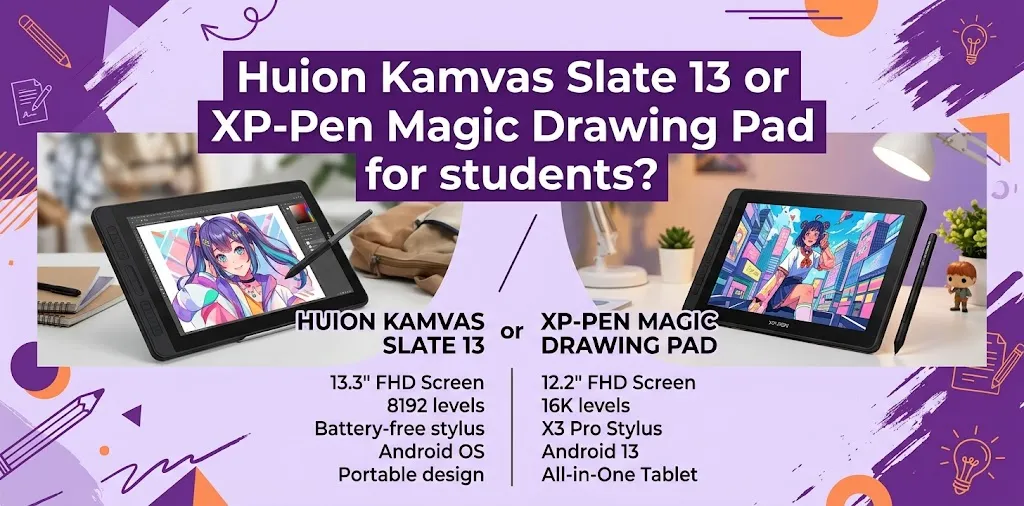
The XP-Pen Magic Drawing Pad is the better choice for most students who want stronger pen performance, lower weight, and an easier tablet to carry every day. The Huion Kamvas Slate 13 is a good alternative for students who prefer a larger 4:3 workspace, longer battery life, and a tablet that feels more like a multipurpose Android device.
Both are standalone Android drawing tablets, so students can draw without connecting to a laptop. That makes either one much more convenient than a traditional pen display when working in a dorm, classroom, library, or coffee shop.
The better choice depends on what kind of student you are and how important drawing quality is compared with screen size, portability, and general tablet use.
The biggest difference: drawing performance versus workspace
The most important difference is not simply the brand.
The XP-Pen Magic Drawing Pad puts more emphasis on the drawing experience. Its X3 Pro Pencil offers 16,384 levels of pressure sensitivity, and its pen performance is generally better suited to detailed sketching, line art, and light pressure shading.
The Huion Kamvas Slate 13 uses a larger 13-inch display with a more square 4:3 shape. This gives you more room for drawing and can also feel comfortable when reading documents, browsing the web, or using several apps.
For students, that creates a simple choice:
- Choose the XP-Pen Magic Drawing Pad if digital art is your main reason for buying the tablet.
- Choose the Huion Kamvas Slate 13 if you want more screen space and plan to use the tablet heavily for both art and everyday school tasks.
Huion Kamvas Slate 13 vs XP-Pen Magic Drawing Pad at a glance
| Feature | Huion Kamvas Slate 13 | XP-Pen Magic Drawing Pad |
|---|---|---|
| Main use | Drawing and general Android use | Drawing-focused portable tablet |
| Screen size | 13 inches | 12.2 inches |
| Screen shape | 4:3 | 3:2 |
| Weight | About 682 g | About 590 g |
| Pressure sensitivity | 4,096 levels | 16,384 levels |
| Tilt support | Up to 60° | Up to 60° |
| Battery | 10,000 mAh | 8,000 mAh |
| Claimed battery life | Up to 14 hours | Up to 13 hours |
| Operating system | Android 14 | Android |
| Best for | Students wanting a larger workspace | Students focused on digital drawing |
Specifications do not tell the whole story, especially with drawing tablets. A larger pressure-sensitivity number does not automatically guarantee better art, but the XP-Pen’s pen system has an important practical advantage for students who want smoother control when sketching and shading.
The Huion offers a larger body and more battery capacity, but the XP-Pen is noticeably lighter for its size.
Which one is better for drawing classes?
For most art and design students, the XP-Pen Magic Drawing Pad is the stronger choice.
Drawing classes often involve long periods of sketching, refining lines, coloring, and making small adjustments. In those situations, pen response matters more than having a slightly larger display.
Independent testing comparing the two tablets found that the XP-Pen produced smoother lines with less visible jitter and handled very light pressure more consistently. The Huion’s larger screen was comfortable, but its pen performance was not as strong in fine drawing situations.
That does not mean the Kamvas Slate 13 is bad for student artwork. It can still handle:
- Basic sketching
- Illustration practice
- Coloring
- Digital note-taking
- Casual concept art
- Comic planning
- Art homework
The difference becomes more noticeable when you spend a lot of time doing careful line work or subtle shading.
A practical example
Imagine an animation student drawing character turnarounds every week.
That student may spend hours cleaning up rough sketches and creating smooth lines. The XP-Pen’s stronger pen response can make that work feel more natural and require fewer corrections.
Now imagine a college student who takes notes during the day and draws for an hour or two at night. The larger 4:3 display on the Huion may be more useful because the tablet gives more comfortable room for both schoolwork and casual art.
Screen size matters more than students may expect
The Huion Kamvas Slate 13 has one of its biggest advantages here.
Its 13-inch display and 4:3 aspect ratio give it a roomier feel than the XP-Pen Magic Drawing Pad. A more square screen can be useful for drawing because you get extra vertical space for your canvas.
That can be especially helpful when:
- Drawing portraits
- Working on vertical illustrations
- Keeping reference images beside your artwork
- Reading textbooks and PDFs
- Taking handwritten notes
The XP-Pen Magic Drawing Pad uses a 3:2 display. It is still large enough for serious drawing, but it has a slightly more portable shape.
For students who move between classes every day, that difference may matter more than it does at home.
Which tablet is easier to carry to school?
The XP-Pen Magic Drawing Pad is the better choice for daily portability.
At about 590 grams, it is lighter than the roughly 682-gram Huion Kamvas Slate 13. The difference may not sound huge, but students often carry more than just a tablet.
You may already have:
- A laptop
- Textbooks
- Chargers
- A water bottle
- A notebook
- Other class materials
A lighter drawing tablet is easier to keep in a backpack without making the bag feel unnecessarily heavy.
The Huion is still portable, but its larger screen and heavier body make it more appealing to students who want to replace some of their other devices.
Example: art student with a busy campus schedule
A student who takes a train to campus, attends several classes, and studies in the library may prefer the XP-Pen because it is easier to carry throughout the day.
A student who mainly works from a dorm room or studio may prefer the Huion’s larger screen because portability is less important.
Battery life: the Huion has a slight advantage on paper
The Huion Kamvas Slate 13 has a 10,000 mAh battery and is rated for up to 14 hours of use under the company’s testing conditions.
The XP-Pen Magic Drawing Pad has an 8,000 mAh battery and is rated for up to 13 hours of battery life.
For students, both should be capable of getting through a typical day, depending on brightness, apps, Wi-Fi use, and how intensively the tablet is being used.
The Huion has the advantage in battery capacity, but the real-world difference may not be large enough to decide the purchase by itself.
If you regularly forget to charge devices, either tablet should be easier to manage than a drawing display that requires constant connection to a laptop.
The Huion is better if you want one tablet for more than art
This is where the Kamvas Slate 13 becomes more appealing.
Its larger 4:3 screen makes it feel more like a traditional productivity tablet. Students can use it for more than digital art, including:
- Reading class PDFs
- Watching lectures
- Browsing the web
- Video calls
- Taking notes
- Viewing reference images
- Basic photo editing
- Entertainment between classes
The Huion also includes four speakers and front and rear cameras, which make it more flexible as a general-purpose student device.
The XP-Pen can also function as a regular Android tablet, but its strongest reason for existing is still the drawing experience.
If your question is, “Which tablet is better for making art?” the XP-Pen has the edge.
If your question is, “Which one can replace more of my other devices?” the Huion deserves serious consideration.
Pen feel can change your experience more than pressure numbers
Students often compare tablets by looking only at pressure sensitivity.
That is useful, but it is not the only thing that affects how a pen feels.
Other important factors include:
- Initial activation force
- Line stability
- Parallax
- Tilt behavior
- Palm rejection
- Stylus comfort
- Surface texture
The Huion H-Pencil has some advantages. Testing has found that it can offer lower parallax and a comfortable physical feel.
However, the XP-Pen X3 Pro Pencil performs better in the areas many artists notice during regular drawing. Its line work is generally smoother, and its light-pressure response is more consistent.
For a student learning digital art, that matters because the tablet should not make basic skills harder than they need to be.
Is the larger Huion screen better for beginners?
Not necessarily.
A larger screen can make drawing more comfortable, but beginners may benefit more from a tablet with stronger pen performance.
A beginner learning:
- Line control
- Pressure control
- Basic shading
- Digital brush settings
- Sketching
- Coloring
will interact with the stylus constantly. If the pen response feels more reliable, learning can be easier.
That gives the XP-Pen Magic Drawing Pad an advantage for a beginner whose main goal is to improve as a digital artist.
The Huion’s larger screen becomes more valuable if the student also needs the device for reading, note-taking, and general schoolwork.
What about screen quality and drawing surface?
Both tablets use a laminated screen design with an anti-glare surface intended to reduce reflections and improve the drawing experience.
The Huion Kamvas Slate 13 has a 99% sRGB color gamut volume and a matte display surface. Its larger workspace is comfortable, especially for students who dislike drawing on smaller screens.
The XP-Pen also has a textured, anti-glare drawing surface designed to create more resistance than a typical glossy tablet screen.
For students, the most important point is that both are built for stylus use. Neither feels like simply drawing on an ordinary phone screen.
Still, if you care more about line quality and pen precision, the XP-Pen remains the stronger option.
Software matters for student artists
Before choosing either tablet, think about the software your classes actually require.
This is one of the most overlooked parts of buying a standalone drawing tablet.
Android drawing tablets are useful for apps such as:
- ibis Paint
- Clip Studio Paint
- Concepts
- Infinite Painter
- Sketchbook
- Other Android-compatible creative apps
However, some college courses may require desktop programs that are not available with the same features on Android.
For example, a student whose course depends heavily on desktop-only software may still need a Windows or Mac computer.
That means you should not assume either tablet can replace your laptop.
Before buying, check these three things
- Ask your instructor which apps or software are required.
- Check whether the Android version has the features you need.
- Find out whether your school requires files in a specific format.
A standalone tablet is excellent for sketching, illustration, and many creative assignments. But it may not replace a computer for advanced 3D work, complex animation, or professional desktop software.
Price can be important, but look at the total student budget
Students should avoid comparing only the sticker price.
The total cost may include:
- The tablet
- A screen protector, if needed
- A replacement stylus
- Extra pen nibs
- A protective sleeve or case
- Paid art software
- Cloud storage
- A keyboard or other accessories
The XP-Pen Magic Drawing Pad and Huion Kamvas Slate 13 are often sold with useful accessories, but packages and US pricing can change.
Check the current package before ordering rather than assuming every retailer includes the same items.
If one tablet costs slightly more but comes with accessories you would otherwise need to buy, it may actually be the better value.
When the Huion Kamvas Slate 13 makes more sense
Choose the Huion Kamvas Slate 13 if most of these points describe you:
- You want the largest drawing area possible.
- You prefer a 4:3 screen for reading and drawing.
- You will use the tablet for schoolwork as well as art.
- Battery capacity is important to you.
- You value a more multipurpose Android experience.
- You usually work at a desk, dorm, or home rather than carrying the tablet all day.
The Huion is especially appealing to students who want one larger device for many different activities.
When the XP-Pen Magic Drawing Pad makes more sense
Choose the XP-Pen Magic Drawing Pad if most of these points describe you:
- Digital drawing is your main priority.
- You want smoother line work.
- You use light pressure for sketching or shading.
- You want a lighter tablet for campus.
- You are serious about improving your digital art skills.
- You prefer a more drawing-focused experience.
For most students buying a standalone tablet primarily for illustration, this is the safer choice.
My recommendation for different types of students
| Student type | Better choice | Why |
|---|---|---|
| Art major | XP-Pen Magic Drawing Pad | Better pen performance for regular drawing |
| Casual student artist | Huion Kamvas Slate 13 | Larger screen and broader everyday use |
| Student who commutes | XP-Pen Magic Drawing Pad | Lighter and easier to carry |
| Student who reads many PDFs | Huion Kamvas Slate 13 | Larger 4:3 workspace |
| Beginner learning digital art | XP-Pen Magic Drawing Pad | More consistent drawing response |
| Student wanting one device for art and media | Huion Kamvas Slate 13 | Larger, more versatile tablet experience |
A mistake students should avoid before buying
Do not choose based only on screen size.
A bigger display looks impressive, but you will spend most of your drawing time interacting with the pen. If the tablet is primarily for art, pen quality should usually matter more than gaining a little extra screen space.
The same applies to specification lists. More RAM, a bigger battery, or a larger display does not automatically create a better drawing experience.
Think about what you will actually do with the device every week.
If you will spend 80% of your time drawing, prioritize drawing performance.
If you will spend half your time reading, taking notes, watching lectures, and browsing, a larger general-purpose tablet may be the better fit.
FAQ
Is the Huion Kamvas Slate 13 good enough for college art students?
Yes, especially for sketching, illustration, class notes, and general creative work. However, students who spend many hours on detailed line art or pressure-sensitive shading may prefer the smoother pen performance of the XP-Pen Magic Drawing Pad.
Can the XP-Pen Magic Drawing Pad replace a laptop for students?
It can handle many art and everyday Android tasks, but it should not automatically be viewed as a complete laptop replacement. Students should check their course software requirements before buying, especially for advanced design, animation, or 3D programs.
Which one is better for beginners who are learning digital art?
The XP-Pen Magic Drawing Pad is generally the better beginner choice when drawing is the main goal because its pen performance is more consistent for line work and light shading. The Huion Kamvas Slate 13 is a better fit for beginners who also want a larger tablet for reading, media, and general school use.
Final verdict
For most students asking, “Huion Kamvas Slate 13 or XP-Pen Magic Drawing Pad?” I would choose the XP-Pen Magic Drawing Pad if the main purpose is digital art.
The Huion Kamvas Slate 13 is the better alternative when you want a larger 4:3 screen and expect to use the tablet almost as much for schoolwork as for drawing.
My practical tip is simple: before buying, make a list of the three tasks you expect to do most often. If two or more are art-related, choose the XP-Pen. If reading, note-taking, and general Android use are just as important as drawing, the Huion may be the better match.